It is importand to get desktop user roles allocated correctly to ensure that users have access to areas of the desktop that they need to complete tasks assigned to them. It is even more importand to lock users out of areas that may have other users/drivers personal details recorded like dates of birth, copies of driving licences, address etc. due to GDPR regulations.
Adding a Deshtop User - allocating roles
Go to All My Employees, from the dropdown select Add Employee
The employees name and email needed to be added and a 6 digit PIN if the user needs access to the Vehocheck App.
You will then need to allocate roles. Each user MUST be a DASHBOARD USER to obtain access to the dashboard and then select a role or multiple roles for each user.
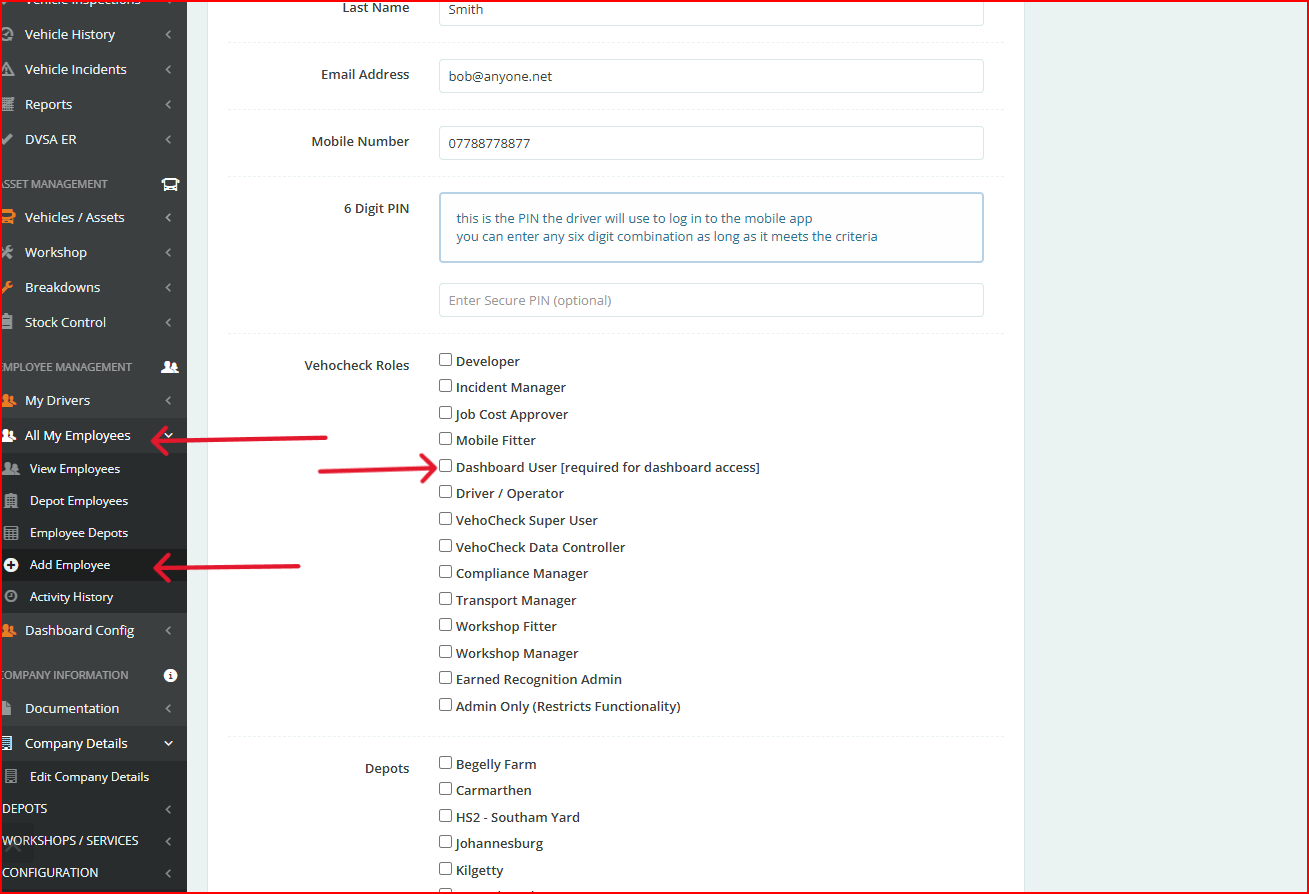
Roles Explained
Developer: Enables developers to use webhooks to track an assets VOR status
Incident Manager: Triggers an email notifcation when an app user reports an incident
Job Cost Approver: Has the ability to set purchase order limit value for employees
Mobile Fitter: Fitters with this role will recieve an email notification when a defect is recorded by a driver/operator
Driver/Operator Access to the app to record walkaround check and report incidents
Vehocheck Super User: Has access to all areas of the desktop and cannot be restricted by other roles. Can edit company details, restrict desktop users roles / access, set up user notifications, classify defect gradings, restrict access to document folders, set company prerences in the app and desktop
Vehocheck Data Controller: Can set the amount of months that are displayed on the dashboard
Compliance Manager: This role is needed to be able to login to the app to perform managers checks also known as gate checks or spot check on vehicles
Transport Manager: Generally has access to everything except Company Config , but can be locked to depot/s.
Workshop Fitter: Access to the calendar and workshop/s to perform repairs, PMIs, job cards etc.
Workshop Manager: Has the abilty to allocate work to individal workshop fitters, can create calendar events,
Earned Recognition Admin: Can limit other users access to the DVSA ER KPI's
Admin Only (Restricts Functionality): Allows users basic functions and locks areas to "view only" so will not be able to edit alendars, delete vehices or drivers
When adding or editing a desktop user it is important to take some other factors into account such as configs that have been enabled that will limit a persons role, see User Restrictions
Was this article helpful?
That’s Great!
Thank you for your feedback
Sorry! We couldn't be helpful
Thank you for your feedback
Feedback sent
We appreciate your effort and will try to fix the article